
See how Good Provisions works.
Watch the overview, then see how invoices, recipes, menu pricing, Toast sales, prep, and Margin Guardian connect in one workflow.
Skip the video — explore the real product with sample data.
90-second overview
Invoice to recipe to menu decision to weekly review. The core loop in under two minutes.
Prefer to test it yourself? Start free and use your own restaurant data.
Margin Guardian tells you exactly when — and how much — to raise prices.
Every time you import an invoice and ingredient costs change, Margin Guardian recalculates every dish on your menu and flags the ones now running over your food cost target.
It does not just show you a red number. It tells you: raise this dish from $15.09 to $16.00 to get back to 30% food cost. That recovers $123/month. One click to apply.
Try Margin Guardian free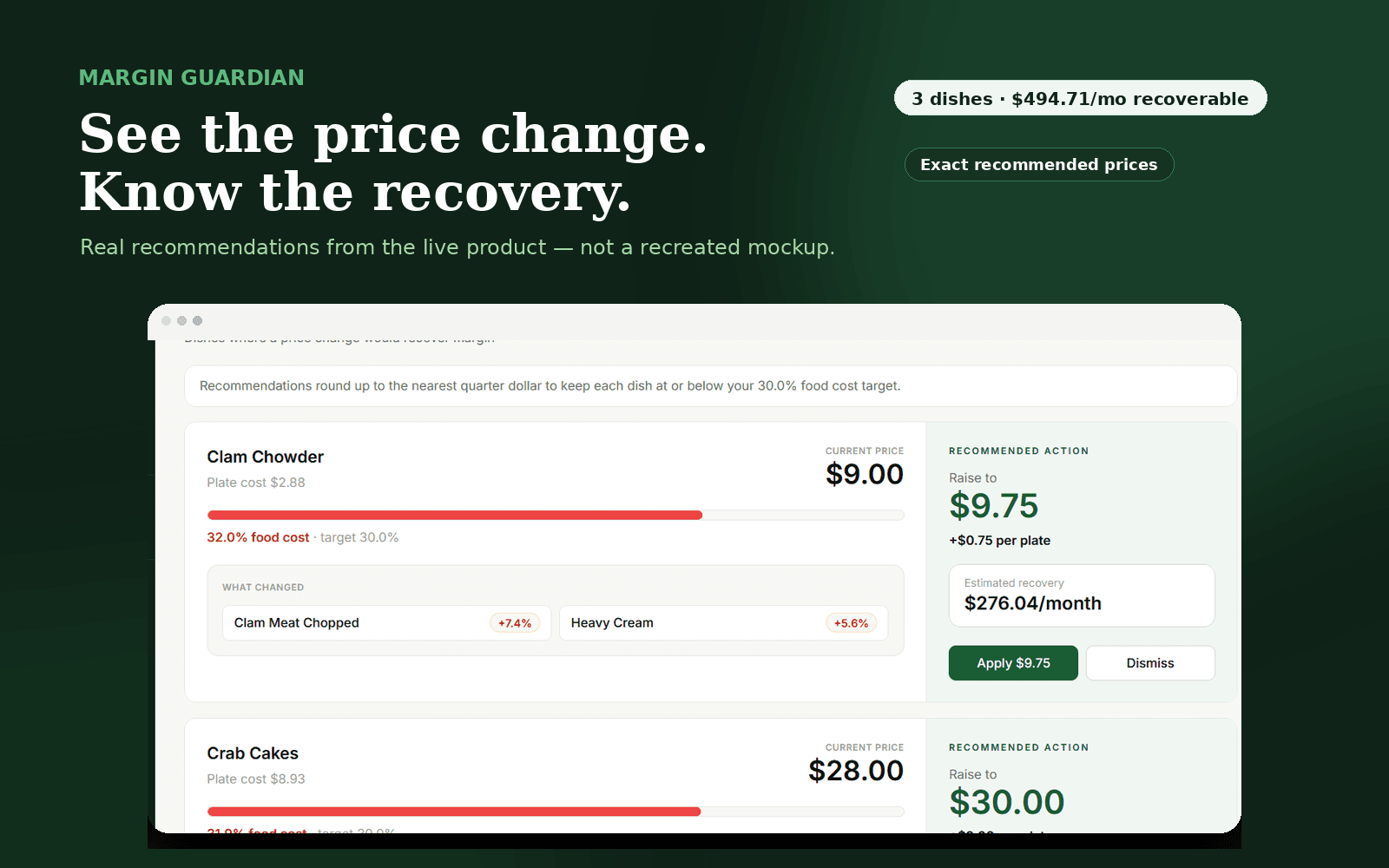
Start with your top 10 menu items.
You do not need your entire menu perfect to get value. Start with the items that sell the most, use real invoice costs, and find the dishes that need attention first. Most restaurants find their first margin recovery in the first session.
Ask about Top 10 Menu CostingFirst session checklist
Import one recent invoice or invoice export.
Add or review your main ingredients.
Cost your top 10 menu items first.
Compare those items against your target food cost.
Import a Toast sales file when you are ready to review weekly performance.
How it works, step by step
The operating loop from first invoice to weekly profit review.
Import your invoices
Forward supplier invoices or import invoice exports. Good Provisions extracts line items, reviews product costs, and updates your ingredient library automatically.
AI cleans up supplier codes into readable ingredient names before you review.
Build your recipe library
Turn your ingredient library into priced recipes. Add ingredients, portions, prep items, sub-recipes, shrink, yield, and serving sizes so each dish has a real plate cost.
Start with your top 10 sellers. You do not need to cost the whole menu on day one.
Review menu pricing — and let Margin Guardian flag what needs fixing
Compare plate cost against menu price and target food cost. Margin Guardian automatically identifies which dishes are over your food cost target after every invoice update, and tells you exactly what to raise prices to.
One click to apply a recommended price change. Most operators find their first recovery in under five minutes.
Import your Toast sales
Export your weekly Toast sales file and import it into Good Provisions. Match sold items to recipes so sales connect back to food cost, gross profit, and menu performance.
Confirm matches before locking in the week.
Turn numbers into kitchen action
Use the dashboard, prep sheets, spending view, inventory variance, and schedule tools to see what needs attention before the week gets away from you.
The goal is not more reports. The goal is clearer decisions.
Get your weekly AI digest
Premium accounts get an AI-generated weekly report: revenue, food cost %, top profit drivers, dishes worth reviewing, specials recommendations using your current inventory, and dietary gap analysis.
Walk in Monday knowing what to fix first.
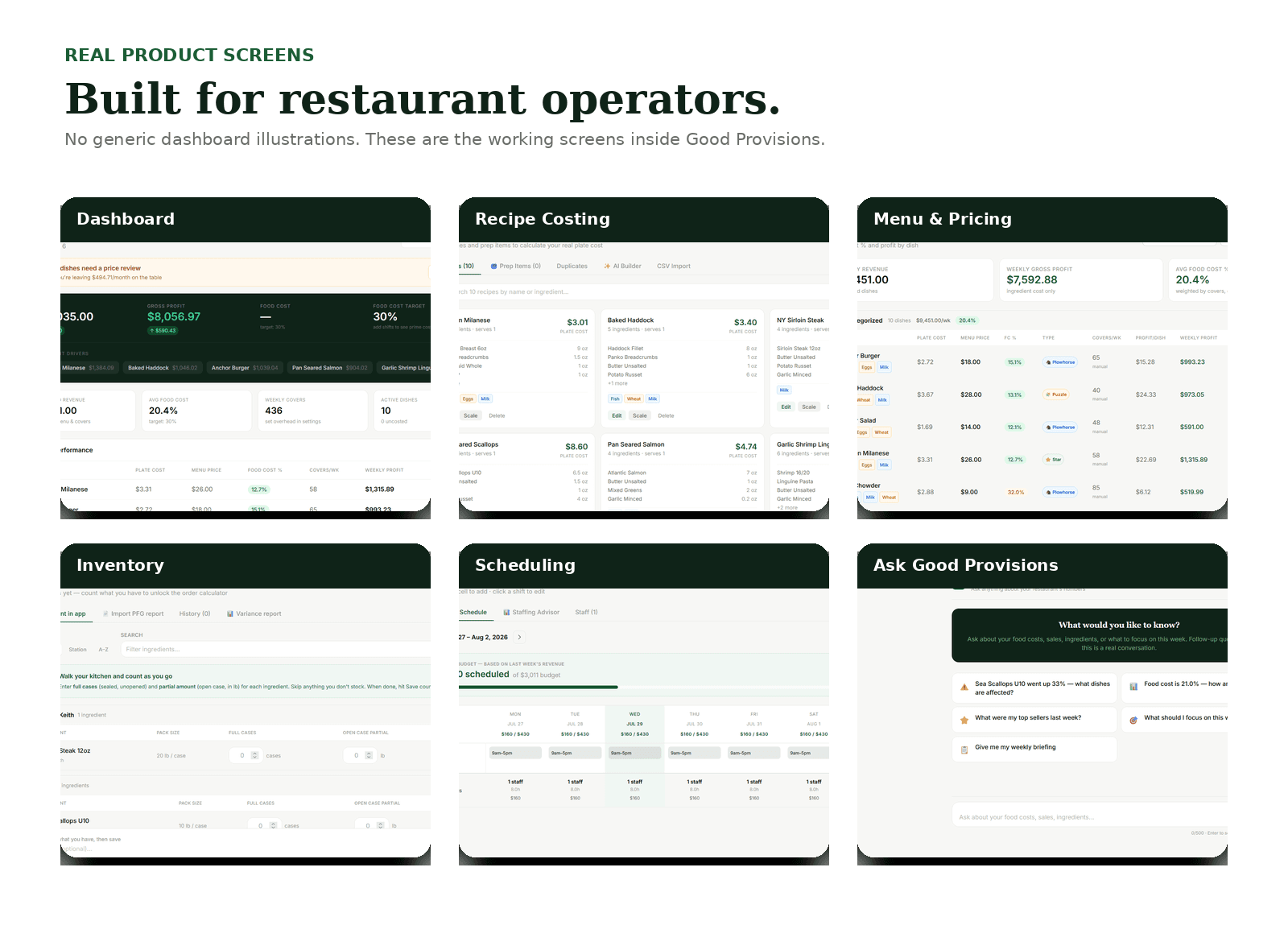
The questions it helps answer.
Good Provisions is not just storage for recipes and invoices. It is built to help you make practical menu and kitchen decisions every week.
Which menu items are over my target food cost right now?
Which dishes need a price increase — and by exactly how much?
Which ingredients spiked in cost after my last invoice?
What dishes are popular but quietly hurting my margin?
What should I prep more of this week based on sales history?
Where should I focus before the weekend?
The best demo is your own data.
Start free, import a real invoice, cost your first few dishes, and let Margin Guardian show you what needs attention. Most operators find their first win in the first hour.
14-day free trial. No credit card required.